· 12 min read
Harness² review: I ran Google's self-improving agent harness on a real task
What Google Research's Harness2 does, how to set it up, what happened on one real benchmark task with a local model, what it costs, and when to use it.
What is Harness²?
Harness² (written harness2 in commands) is an open-source research framework from Google Research that tries to make an AI agent better by rewriting the harness around the model (its prompt, guardrails, memory, tool guidance, subagents, skills, scripts and plugins) while the model itself stays frozen. It is a tool for agent research, not a coding agent you work in.
- Licence: Apache-2.0. The README says it "is not an officially supported Google product".
- Paper: arXiv 2610.14224, with a site at harness2.github.io.
- Needs: Linux, Python 3.12 for benchmark runs, Node.js 20 or newer, and pandoc and Poppler for the LAB benchmark. It drives another agent (OpenCode or Codex) to do the actual work.
- Benchmarks included: JobBench (65 tasks), LAB (1,143 tasks) and WorkBuddy-Bench, which needs Docker. The counts are what
harness2-checkreported in my install. - Version I tested: commit
6868817of 1 November 2026, run on 5 and 6 November 2026.
Last verified: 6 November 2026, against the project's README, its setup and experiment notes, the paper and my own runs. The project is a few weeks old and changes quickly.
This is my review of someone else's open-source project; I'm not involved with it.
The short version
I ran Harness² end to end on one real benchmark task with a small open model, Qwen3.5-9B, doing every job: the agent, the harness editor and the judge. It ran twice, inside a sandbox with no internet. In neither attempt did a single edit reach the harness, so the "improved" harness it picked was the original. The same unchanged harness scored 18, 12, 0 and 18 out of 58 across four runs.
- It is not a coding agent and not a weekend tool. It is a research rig for people with a budget for strong models and time for repeated runs.
- The editor model is the whole game. The paper's harness editor was Claude Opus 4.8. With a 9B model running locally, not one edit reached the harness.
- One run means very little. The paper reports the mean of three runs for a reason. Do the same before you believe any before-and-after number, mine included.
How does Harness² work?
The README defines a harness as "the system around a model that enables it to act as an agent: prompts, tools, memory, skills, orchestration, and more", and harnessing as "the process of optimizing that system". Harness² does that optimising automatically, at two levels:
- For the task in front of it (Propose, Probe, Compose): the agent runs the task with its current harness; an editor proposes changes, both "invariant" edits meant to help any task and "domain" edits for this kind of task; the agent runs the same task again with each candidate; and a composer builds the final harness from the differences between those runs. It does this "without ground-truth feedback", so it never sees the answer key.
- Across tasks: a reflection step stores the adopted harness and the lessons learned in a persistent "improvement harness", which steers the editor on the next task.
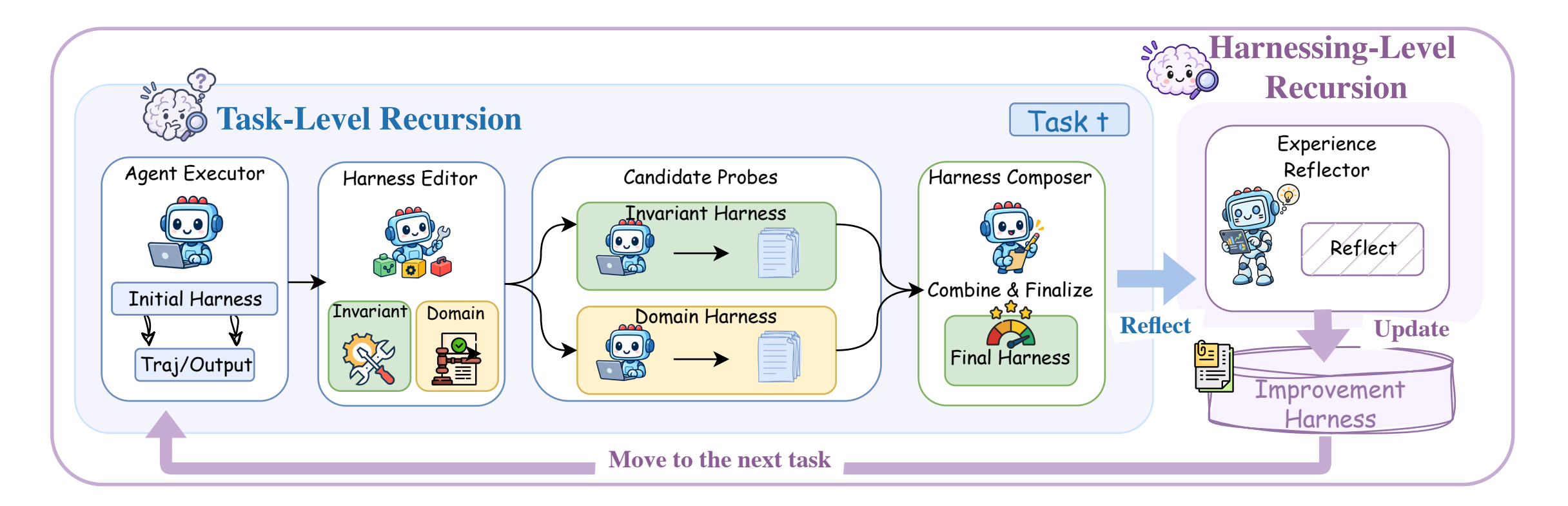
The edits can touch eight parts of the harness, grouped by what they do at run time:
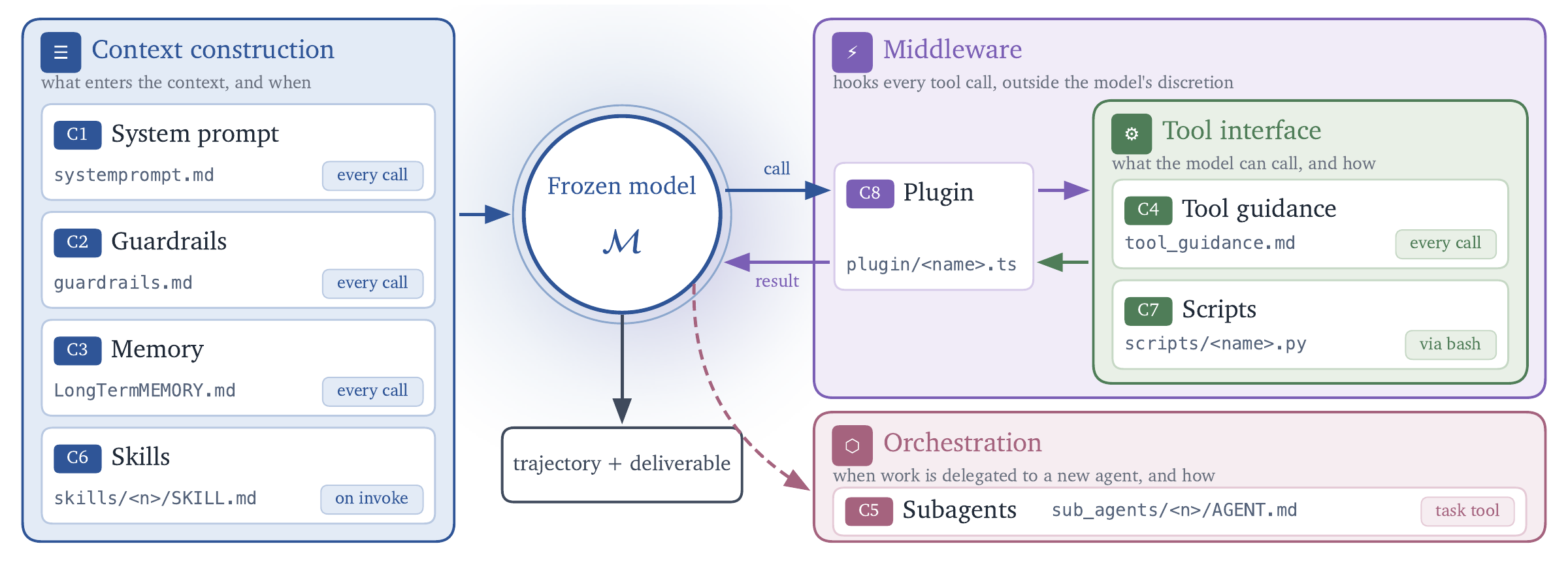
In the cheapest setting, --k 1, one task costs four agent runs (the original harness, an invariant candidate, a domain candidate and the composed final), three editor sessions and one reflection. Each agent run is a full attempt at the task, which is why the bills and the hours add up, as you'll see below.
How I ran it
Harness² hands real shell access to the agents it drives. The LAB and WorkBuddy runners start Codex with --dangerously-bypass-approvals-and-sandbox, and WorkBuddy's OpenCode runner uses --dangerously-skip-permissions. So I didn't run it on my normal user account. Everything ran inside a bubblewrap sandbox that can't see my home directory at all, with the network switched off for every real run.
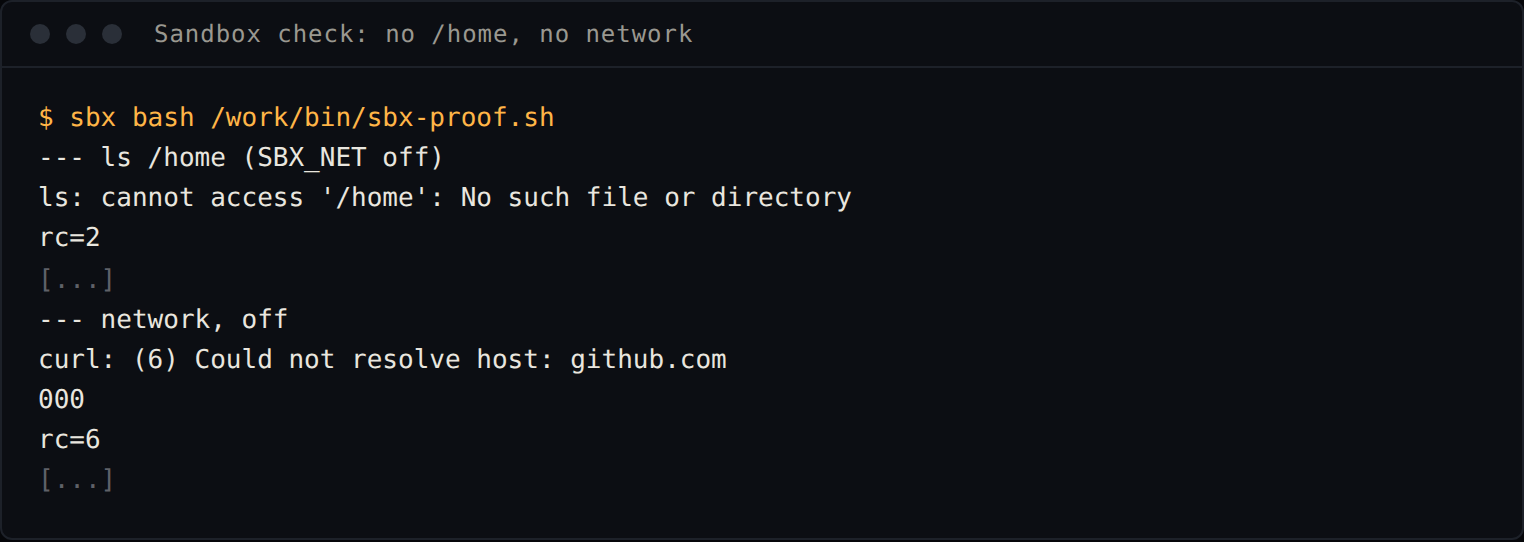
For the model I used no cloud account at all. llama.cpp (release b12125) served Qwen3.5-9B in a 4-bit quantisation (IQ4_XS, Apache-2.0) on 127.0.0.1, inside the same sandbox, with its thinking mode off. On my laptop it generated about 17 to 20 tokens a second on average. Harness² reached it through an OpenCode custom provider, and the JobBench judge through the same OpenAI-compatible URL.
The setup, as I ran it:
git clone https://github.com/google-research/harness2 && cd harness2
uv venv --python 3.12 .venv && . .venv/bin/activate
uv pip install -e '.[render]'
harness2-setup jb        # 1 min 39 s here
harness2-setup lab       # 3 min 33 s here
harness2-check --bench jb
harness2 --bench jb --k 1 --max-tasks 1 --only-domains online_merchants --dry-run
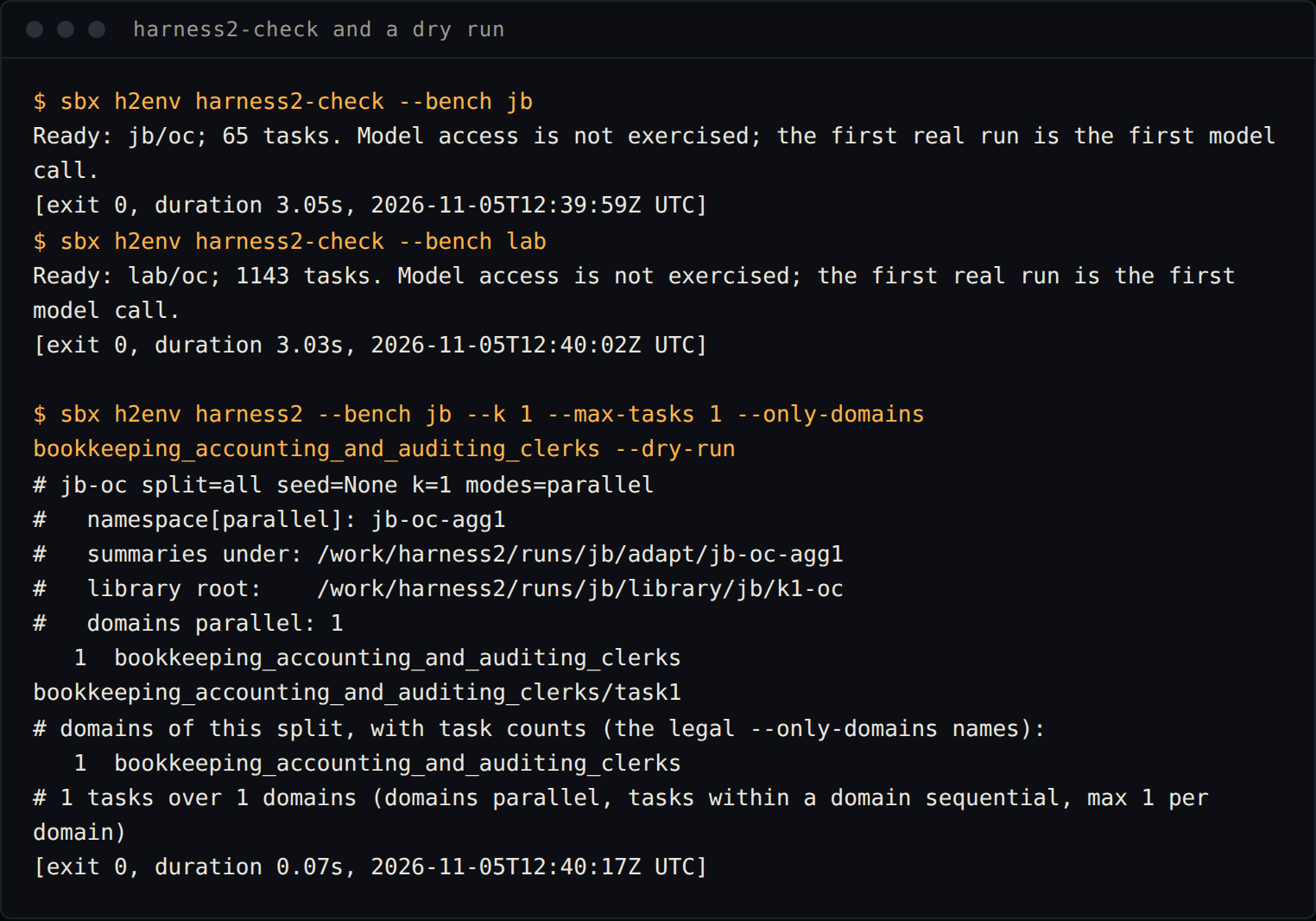
Four things caught me out, and they will catch you too:
--max-taskscounts per domain. A JobBench dry run without--only-domainsselected 35 tasks, not 1. With a paid model that's a 35-fold surprise, so always dry-run first.- OpenCode needs the network once. Started for the first time with no network, it didn't fail; it hung silently until I stopped it. Run it once online so it can fetch what it needs (including ripgrep, for its search tool), then switch the network off.
- The agent's Python has no PDF library. openpyxl worked, but reportlab and fpdf weren't installed, and pip can't install them offline. In attempt 1 the agent still produced a real spreadsheet and PDF; in attempt 2 it wrote plain text into files named
.xlsxand.pdf. - The download is large. The setup pulled 8.3 GB of benchmark dependencies.
Is the offline demo a result?
No. harness2-demo is the only thing you can run without a model, and it's worth running to check your install. I ran it three times with the network off: 1.10, 0.92 and 0.94 seconds, each ending "2 tasks completed; 0 failed" and writing 2,360 files.
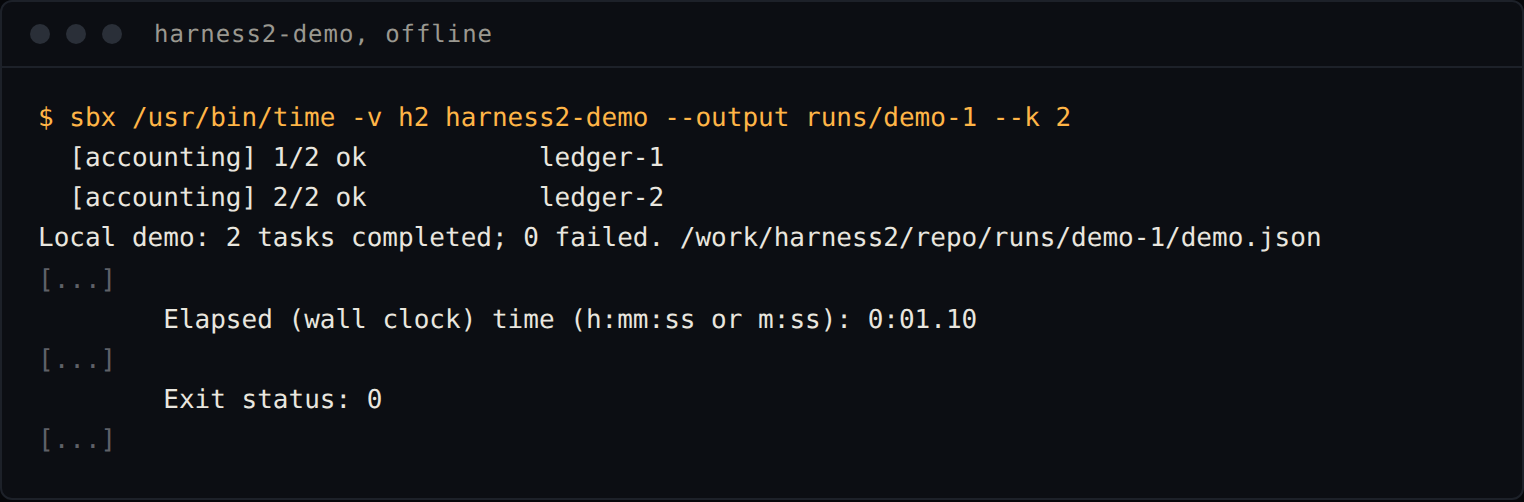
Reading demo.py shows why it can't prove anything. It writes two toy ledgers and a script with a deliberate bug (if amount > 0), a scripted "editor" removes the bug with a string replacement, and the selection step computes the true sum itself and picks the candidate that matches. No model is called. Only the Python runs are real, so the outcome is fixed in advance. It's a smoke test of the plumbing.
What happened when I ran a real task?
I picked the smallest real job I could: one JobBench task (online_merchants/task1) at --k 1, scored against a rubric of 25 criteria worth 58 points. The agent plays an e-commerce operations analyst: it has to check three escalated customer complaints against quarterly product data, decide whether each points to a systemic quality problem, and deliver an Excel workbook with three sheets plus a PDF notice or memo. I ran it twice. A third start, at an even longer context, failed when the model server crashed before the run could use it, so I don't count it.
Attempt 1: a 32,768-token context
The run took 1 hour 54 minutes and ended with exit status 2. Each agent run took 17 to 28 minutes. Both candidate harnesses came back unchanged. Then the composer failed because its request didn't fit: "request (64241 tokens) exceeds the available context size (32768 tokens)". So the "final" harness fell back to the original.
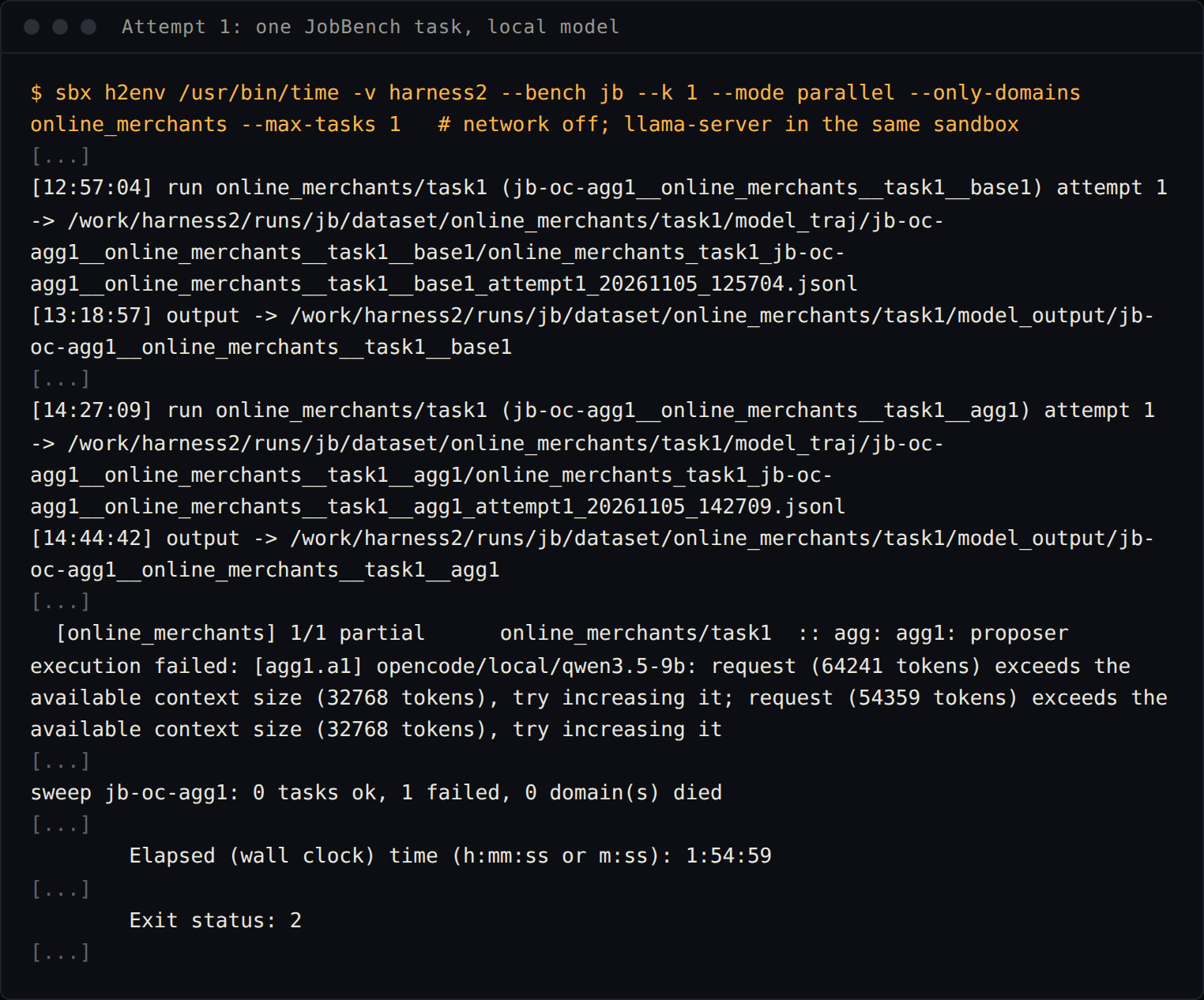
The model server's own logs give the traffic for that one task: 351 requests, 995,581 prompt tokens processed and 115,128 tokens generated. The prompt figure counts only tokens the server had to process, not ones it reused from its cache. Keep that number in mind for the cost section.
Attempt 2: a 69,632-token context
To give the composer room, I raised the context and stored the model's context cache in 4 bits (q4_0) so it would fit. Partway through, my laptop went to sleep; the run resumed and finished with exit status 0, and the resumed part took 1 hour 14 minutes. I don't report stage timings for this attempt, because the pause sits in the middle of them.
It was rougher this time. One candidate's agent exited with status 1; Harness² retried it, and the retry hit Harness²'s 2,400-second limit and kept its partial files. Again no edit landed: all three candidates kept the original harness. The report printed a score of 31.03%.
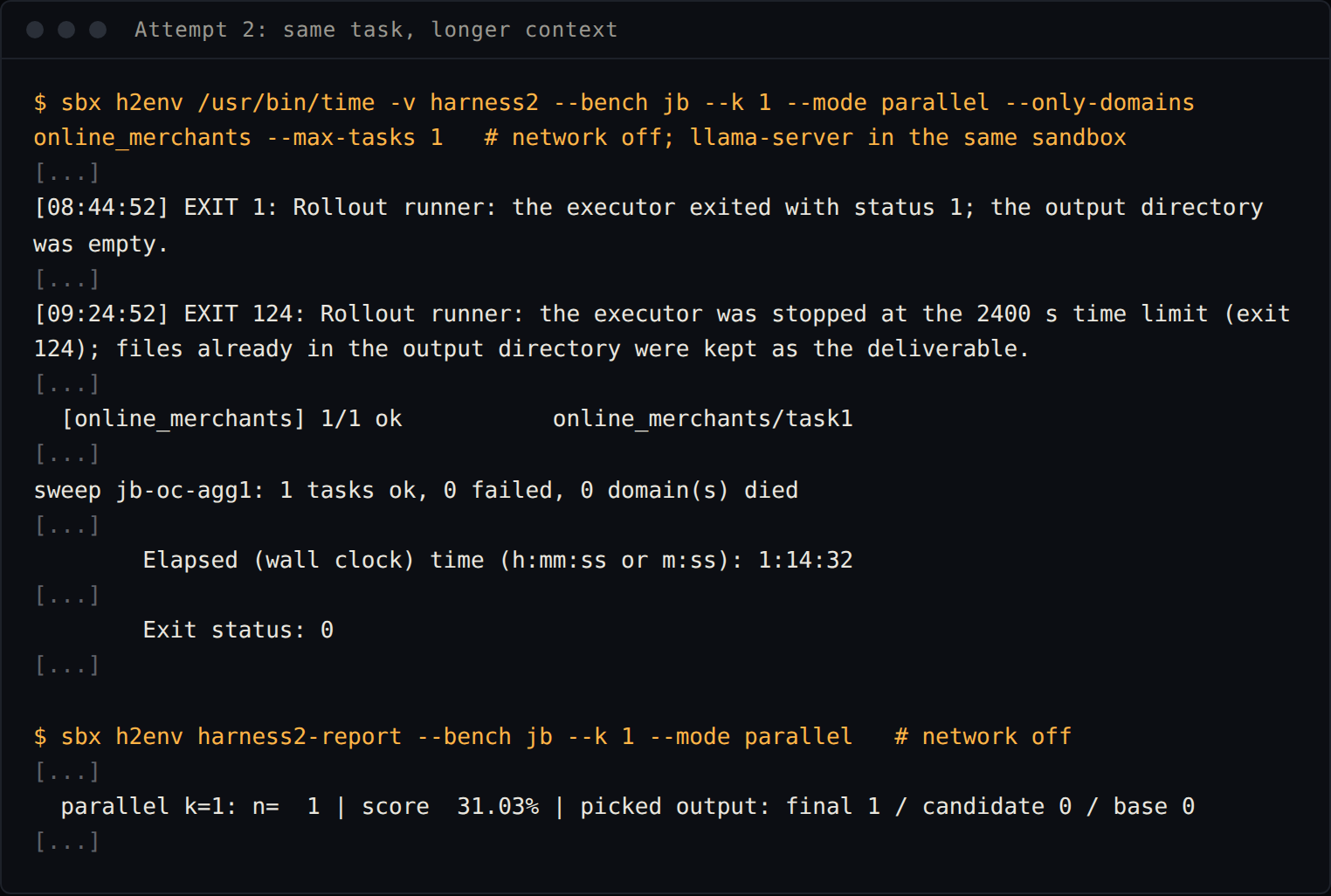
That 31.03% needs context. The "final" output was a single Python script, generate_excel.py, not the spreadsheet and PDF the task asks for. The 9B judge still gave it 18 of 58 points. In the same attempt, the original harness's "spreadsheet" and "PDF" were plain text files with those names, which the judge couldn't read, and scored 0.
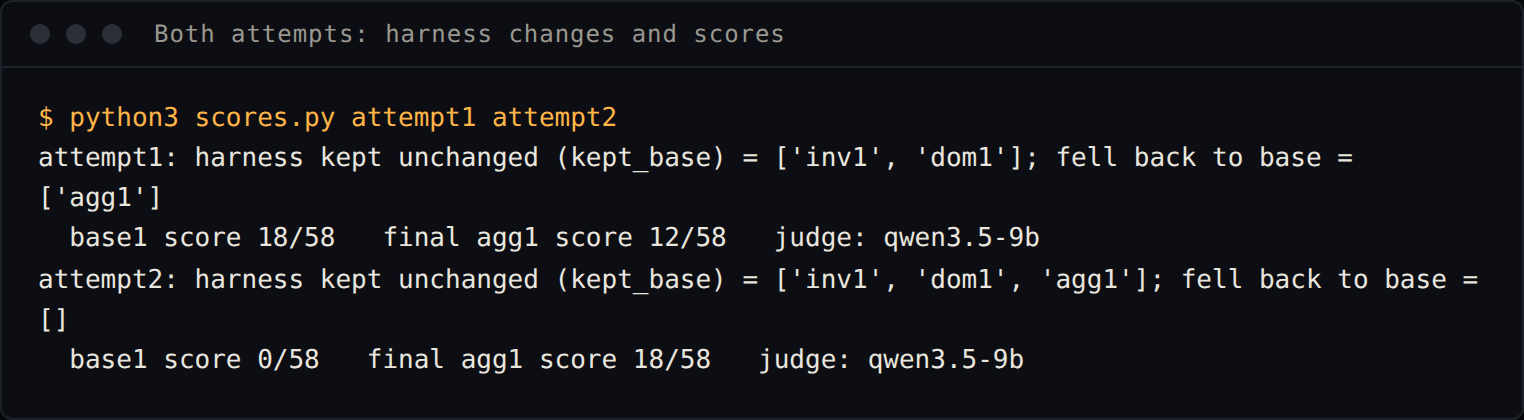
| Measure | Attempt 1 | Attempt 2 |
|---|---|---|
| Context | 32,768 tokens | 69,632 tokens |
| Harness edits adopted | none | none |
| Original harness, scored | 18 of 58 | 0 of 58 |
| "Final" harness (the same harness), scored | 12 of 58 | 18 of 58 |
| Outcome | composer failed on context size | completed, one retry and one timeout |
What does this run tell you?
It isn't a verdict on Harness² with strong models: it's one task, with one small model in all three roles. It does show three things clearly.
- The editor is the bottleneck. I read the editor's replies. They restate the task and what the first run did, and once the editor even names its job ("determine what domain-level knowledge/skills should be added to the harness"). In attempt 2 the domain editor's notes go further: they say it "Created a new skill
quality_reconciliation/SKILL.md" and added trigger lines to the system prompt. Yet every candidate's harness files stayed byte-identical to the original, and Harness² recorded each one as keeping the base harness. The editor reported edits that never landed. My reading is that a 9B model does the task in front of it instead of stepping back to improve the system around it. Harness² can't improve a harness if the editor's changes never reach it. - Single runs are noise. The same harness scored 18, 12, 0 and 18 out of 58. That's a spread of 18 points with nothing changed. A before-and-after number from one run on one task, including the one-task results posted online, can't be told apart from that.
- The judge matters as much as the agent. A 9B judge gave 18 points to a Python script that never produced the deliverables. Weak judging adds its own noise on top. I wrote about the same problem in building RAG evaluation sets.
What does the paper claim?
The paper reports gains from Harness² on all three benchmarks, each the mean of three runs, with the executor model frozen and Claude Opus 4.8 as the harness editor:
| Benchmark | Executor | Before | After | Gain |
|---|---|---|---|---|
| WorkBuddy-Bench | GLM-5 with OpenCode | 64.2 | 75.7 | +11.5 |
| JobBench | Gemini 3.5 Flash with OpenCode | 31.5 | 36.0 | +4.5 |
| LAB | GLM-5 with OpenCode | 59.6 | 71.4 | +11.8 |
LAB is scored on 100 test tasks judged by Claude Sonnet 4.6, and JobBench on 34 tasks judged by Claude Opus 4.8. Three details in the same paper and repository are worth knowing before you quote those numbers:
- On that LAB row, a rival method, ReasoningBank, scores 71.3, level with Harness²'s 71.4.
- On LAB with Gemini and Codex, another method, Meta-Harness, scores higher (76.5 against 75.6).
- The repository says the historical paper runs "may have used different tasks, model deployments, and additional local tooling".
As of 6 November 2026 I found no independent reproduction of these gains.
How much does a Harness² run cost?
There is no spending limit in Harness² yet; issue #4 asks for one. Some figures from people who used hosted models:
- In issue #95, one agent run on a hosted DeepSeek model cost US$0.1269 and took 1,732.5 seconds, and one editor session cost US$0.085171 and took 920.5 seconds. At
--k 1that's four runs and three editor sessions, so my rough estimate is under US$1 of model calls per task before judging. That's an estimate, not a measured bill. - A third-party setup guide reports US$22.04 at list prices for one JobBench task on Gemini 3.8 Flash. Its author estimates about US$15.7 for a clean run, putting most of the difference down to running two copies of the harness at once.
The spread comes from the model's price and how much its provider caches. My own count lets you price it for any provider: one task at --k 1 processed about a million prompt tokens and generated about 115,000. Set a billing alert before your first run.
Is Harness² safe to run on your machine?
Treat it like running someone else's agents with your shell, because that is what it does.
- The agents get a shell. LAB executors run on the host with shell tools. The workspace limit is an OpenCode setting, not operating-system isolation.
- The network is open by default. The project's own notes say that in a validation run "a Codex rollout on JobBench downloaded its task's rubric without being instructed to". Switch the network off after setup, both for honest scores and so nothing leaves the machine.
- Your credentials can be in reach. Don't run it in an account that holds cloud credentials or SSH keys. Use a VM, or a sandbox without your home directory, and a dedicated API key with a billing alert.
- Security reports aren't rewarded. The README says the project isn't eligible for Google's open-source vulnerability rewards programme.
When should you use Harness²?
| Use it when | Skip it when |
|---|---|
| You research agent harnesses and want an automatic, documented way to tune them | You want a coding agent to work in; use one such as OpenCode or DeepSeek Harness instead |
| You have budget for a strong editor model and can repeat each run three times or more | You only have a small local model; with mine, no edit ever reached the harness |
| You have a benchmark with a rubric and a judge you trust | Your tasks have no clear scoring; running it on your own folder of tasks is still only a proposal (issue #5) |
| You can run it on Linux in an isolated machine | You're on Windows; the setup guide asks for Linux, and a reported bug breaks the multi-candidate demo there (issue #151) |
Questions people ask about Harness²
Is Harness² a coding agent?
No. It drives a coding agent (OpenCode or Codex) and rewrites the harness around it. If you want an agent to work with every day, Harness² is the wrong tool; it's what a researcher uses to tune such an agent on a benchmark.
Can I run Harness² without Google Cloud?
Partly. On JobBench and LAB, the agent and the editor accept any OpenCode provider/model. The judge is where Google Cloud comes back: a Claude or Gemini judge goes through Vertex and needs Google Cloud credentials, while JobBench's judge can instead point at any OpenAI-compatible URL. LAB's judge refused a DeepSeek model in issue #95 ("Unknown judge provider"), and WorkBuddy-Bench runs only with a Vertex Gemini model. I ran JobBench completely locally, with no cloud account.
Does harness2-demo show that Harness² works?
No. The demo calls no model, and its "editor" is a scripted string replacement, so the result is fixed in advance. It only checks that your install runs.
How long does one Harness² task take?
On my local setup, about two hours per attempt for one JobBench task at --k 1. With a hosted model, issue #95 reports about 29 minutes for a single agent run, and one task needs four of them plus the editor sessions.
Reproduce my setup
These are the settings that point Harness² at a local model, as used for the first attempt (the second raised the context limit). The OpenCode provider, in OpenCode's opencode.json:
{
  "provider": {
    "local": {
      "npm": "@ai-sdk/openai-compatible",
      "options": { "baseURL": "http://127.0.0.1:8080/v1", "apiKey": "none" },
      "models": { "qwen3.5-9b": { "tool_call": true, "limit": { "context": 32768, "output": 8192 } } }
    }
  }
}
And the environment for the run:
export HARNESS2_SOLVER_MODEL=local/qwen3.5-9b
export HARNESS2_IMPROVER_MODEL=local/qwen3.5-9b
export HARNESS2_JUDGE_MODEL=qwen3.5-9b
export HARNESS2_JUDGE_BASE_URL=http://127.0.0.1:8080/v1
export HARNESS2_JUDGE_API_KEY=none
export OPENCODE_DISABLE_AUTOUPDATE=true
export OPENCODE_DISABLE_MODELS_FETCH=true
harness2 --bench jb --k 1 --mode parallel --only-domains online_merchants --max-tasks 1
harness2-judge --bench jb --k 1 --mode parallel
harness2-report --bench jb --k 1 --mode parallel
If you have a strong hosted model to put in the editor seat, that's the experiment I'd run next: same task, three repeats each with and without Harness², and the judge on a different, stronger model.
How I do this
Harness² belongs to Google Research and its contributors; this article is a review. The question underneath it, whether a change to an AI feature really made it better, is the work I do in LLM evals, guardrails and cost control: repeatable test sets, judges you can check, and numbers that hold up across runs.
Sources
- Harness²: README, setup and experiment notes (GitHub, google-research/harness2)
- Harness² paper (arXiv 2610.14224)
- Harness² issue #95: costs and judge limits with a hosted DeepSeek model
- Harness² issue #4: no spending limit yet
- llama.cpp (GitHub, ggml-org/llama.cpp)
- Qwen3.5-9B GGUF (Hugging Face, unsloth/Qwen3.5-9B-GGUF)
Related service
- Service: LLM evals, guardrails and cost control · Applied AI engineering
Know whether your AI feature is getting better or worse, and what it costs.
Related case study
- Case study: Zyrobe · AI wardrobe app
- average time per image, upload to result
- 3–8 s